Configuration
CrateDigger works without a config file. Built-in defaults cover everything. Create a config file only to override specific settings.
Config file locations
CrateDigger merges configuration from three layers in this order, with later layers overriding earlier ones:
- Built-in defaults: always present, covers all settings
- User config:
~/CrateDigger/config.toml(Linux / macOS) orDocuments\CrateDigger\config.toml(Windows) - Library config:
{library}/.cratedigger/config.toml
Only include the settings you want to change. Everything else falls back to built-in defaults.
You can also pass an explicit path with --config <path> on any command. This acts as your user config for that run.
Custom data directory
Set the CRATEDIGGER_DATA_DIR environment variable to read and write the visible data folder (config, places, artists, logos) from a different location, for example a shared volume or an external drive. Both CrateDigger and TrackSplit honour this variable, so pointing them at the same path keeps them aligned. The directory must already exist; CrateDigger does not create it. If you want your existing data there, move or copy it yourself before setting the variable. CrateDigger falls back to the platform default when the variable is unset, empty, or points at a missing or non-directory path.
If you have cloned the CrateDigger repository into ~/CrateDigger/ on Linux or the equivalent default folder on other platforms, CrateDigger will warn at startup that the data folder appears to be a source checkout. Set CRATEDIGGER_DATA_DIR to a separate dedicated folder to resolve the warning and keep your curated data files away from the repository.
Caches and logs live in separate platform directories
CRATEDIGGER_DATA_DIR only controls the visible data folder (config, places, artists, logos). Caches (dj_cache.json, mbid_cache.json, artist artwork) and logs follow standard platform conventions and are not affected by this variable. On Linux, they live under ~/.cache/CrateDigger/ and ~/.local/state/CrateDigger/log/ respectively. If you need to relocate those as well, set the standard XDG_CACHE_HOME or XDG_STATE_HOME environment variables. Note that these apply system-wide to all XDG-aware applications, and platformdirs appends CrateDigger/ automatically, so XDG_CACHE_HOME=/data/cache results in /data/cache/CrateDigger/.
Getting a starter config
The example config contains all available settings with comments. Copy it to your user config location:
Or, if you have cloned the repository:
Config sections
Default layout
The folder layout used by organize when --layout is not specified. Available values: artist_flat, place_flat, artist_nested, place_nested. The older names festival_flat and festival_nested are silently mapped to place_flat and place_nested when read from this key; the --layout command-line flag accepts only the current names. See Organize: layouts for what each looks like.
Layouts
[layouts.artist_flat]
festival_set = "{artist}"
concert_film = "{artist}"

[layouts.place_flat]
festival_set = "{place}{ edition}"
concert_film = "{artist}"

[layouts.artist_nested]
festival_set = "{artist}/{place}{ edition}/{year}"
concert_film = "{artist}/{year} - {title}"

[layouts.place_nested]
festival_set = "{place}{ edition}/{year}/{artist}"
concert_film = "{artist}/{year} - {title}"
Folder path templates for each layout and content type. The {place} token resolves to the canonical name of the festival, club, or venue associated with the set. See Organize: template syntax for how optional tokens work.
Deprecated layout names: a default_layout value of festival_flat or festival_nested is silently mapped to place_flat or place_nested at load time. Custom [layouts.festival_flat] or [layouts.festival_nested] sections are NOT consulted after that mapping; if you carry one in your config, rename the section to the current layout name or your customisations are ignored.
Filename templates
[filename_templates]
festival_set = "{year} - {artist}{ - place}{ edition}{ [stage]}{ - set_title}"
concert_film = "{artist} - {title}{ (year)}"
Templates for generated filenames. The original file extension is preserved automatically. The { - place} token is optional: it is included only when a place name is available. See Organize: template syntax for field names and optional token syntax.
Template tokens: {place} is the routing token for the associated festival, club, or venue. The older {festival} token was removed in 0.15.0: templates that still contain it render the fallback text "Unknown" in its place, so update any custom template to {place}.
Date tokens: {date} renders the full event date in ISO yyyy-mm-dd form when known. {month} and {day} render the zero-padded components sliced from that date and stay empty when only the year is known, so the optional-token form degrades gracefully:
[filename_templates]
festival_set = "{year}{-month}{-day} - {artist}{ - place}{ edition}{ [stage]}{ - set_title}"
renders 2024-06-15 - Tiesto - Tomorrowland [Mainstage] for a fully dated set and 2024 - Tiesto - Tomorrowland [Mainstage] when only the year is known. Any order works, and any punctuation separator ({day-}{month-}{year}, {year}{.month}{.day}). See Organize: template syntax for the full field list.
Content type rules
Path rules that force a file to be classified as concert_film or festival_set, bypassing automatic classification. Each rule is a pattern matched against the file's path relative to the source root. Use * to match anything within a single folder name, or /* after a folder name to match everything inside it. For example, Coldplay/* matches any file directly inside a Coldplay folder.
Skip patterns
Path patterns for files and folders to skip during scanning. Matched against the relative path. Useful for ignoring Blu-ray disc structures (*/BDMV/*) or demo content.
Media extensions
[media_extensions]
video = [".mp4", ".mkv", ".webm", ".avi", ".mov", ".m2ts", ".ts"]
audio = [".mp3", ".m4a", ".flac", ".wav", ".aac", ".ogg", ".opus"]
File extensions recognized as media files, grouped by type. Add extensions here if CrateDigger is not picking up a file type you use.
Fallback values
[fallback_values]
unknown_artist = "Unknown Artist"
unknown_place = "_Needs Review"
unknown_year = "Unknown Year"
unknown_title = "Unknown Title"
Placeholder values used in folder and filename templates when metadata is missing. _Needs Review sorts near the top in most file managers, making unclassified files easy to find.
Removed key: unknown_festival was replaced by unknown_place in 0.15.0 and is no longer read. Leaving it in your config has no effect on unknown_place and produces no warning, so set unknown_place directly.
Poster settings
[poster_settings]
artist_background_priority = ["dj_artwork", "fanart_tv", "gradient"]
place_background_priority = ["curated_logo", "gradient"]
year_background_priority = ["gradient"]
Priority chains for poster background image selection. CrateDigger tries each source in order and uses the first one available.
| Source | Description |
|---|---|
dj_artwork |
DJ photo from 1001Tracklists (embedded during identify) |
fanart_tv |
Artist artwork from fanart.tv |
curated_logo |
Hand-placed place logo (see audit-logos) |
gradient |
Color gradient generated from metadata (always available) |
place_background_priority controls background selection for festival sets routed by a named place (festival, club, or venue). When the set has no linked place, the artist_background_priority chain is used instead, so the poster comes out as a proper artist poster rather than a plain gradient.
Removed key: festival_background_priority was replaced by place_background_priority in 0.15.0 and is no longer read. Setting it is a silent no-op: the value is not copied into place_background_priority and no warning is logged, so rename the key in your config.toml.
Tracklists
[tracklists]
email = ""
password = ""
delay_seconds = 5
chapter_language = "eng"
auto_select = false
genre_top_n = 5
overlay_chapters = true
overlay_fold_seconds = 20
chapter_title_labels = false
Settings for 1001Tracklists integration. See Tracklists integration for account setup details.
| Key | Description |
|---|---|
email |
1001Tracklists account email |
password |
1001Tracklists account password |
delay_seconds |
Pause between files during identify (default: 5); override per run with --delay |
chapter_language |
Language code embedded in chapter names (default: "eng") |
auto_select |
Set to true to make --auto the default for identify (default: false) |
genre_top_n |
Maximum genres written to the album-level tag; tallied by frequency, ties broken by first appearance; 0 disables the cap (default: 5) |
overlay_chapters |
When true (default), "w/" overlay tracks are processed and either folded into the host chapter or given their own chapter; when false, overlays are ignored and only main-track chapters are written |
overlay_fold_seconds |
Seconds after the host main track an overlay must enter to become its own chapter; overlays inside the window fold in as Artist A vs. Artist B - Title A vs. Title B; 0 gives every timecoded overlay its own chapter; a large value folds everything (default: 20) |
chapter_title_labels |
When false (default), the record label is omitted from the visible chapter title but still written to CRATEDIGGER_TRACK_LABEL; when true, chapter titles include the trailing [Label] (for example, These Are The Times [STMPD]) |
Credentials can also be set via environment variables: TRACKLISTS_EMAIL and TRACKLISTS_PASSWORD.
Fanart
Settings for fanart.tv artist artwork lookups. A project API key is built into CrateDigger. Adding your own personal key improves rate limits for large libraries.
Get a personal API key at fanart.tv.
| Key | Description |
|---|---|
personal_api_key |
Your personal fanart.tv API key (optional) |
enabled |
Set to false to disable fanart.tv lookups entirely (default: true) |
Environment variable overrides: FANART_PERSONAL_API_KEY, FANART_PROJECT_API_KEY (for the built-in project key).
Kodi
Kodi JSON-RPC connection settings for automatic library refresh after enrich or organize. See Kodi integration for setup instructions.
| Key | Description |
|---|---|
enabled |
Set to true to enable Kodi sync (default: false) |
host |
Kodi host name or IP address (default: "localhost") |
port |
Kodi JSON-RPC port (default: 8080) |
username |
Kodi username (default: "kodi") |
password |
Kodi password |
All Kodi settings can also be set via environment variables: KODI_HOST, KODI_PORT, KODI_USERNAME, KODI_PASSWORD.
Email notifications
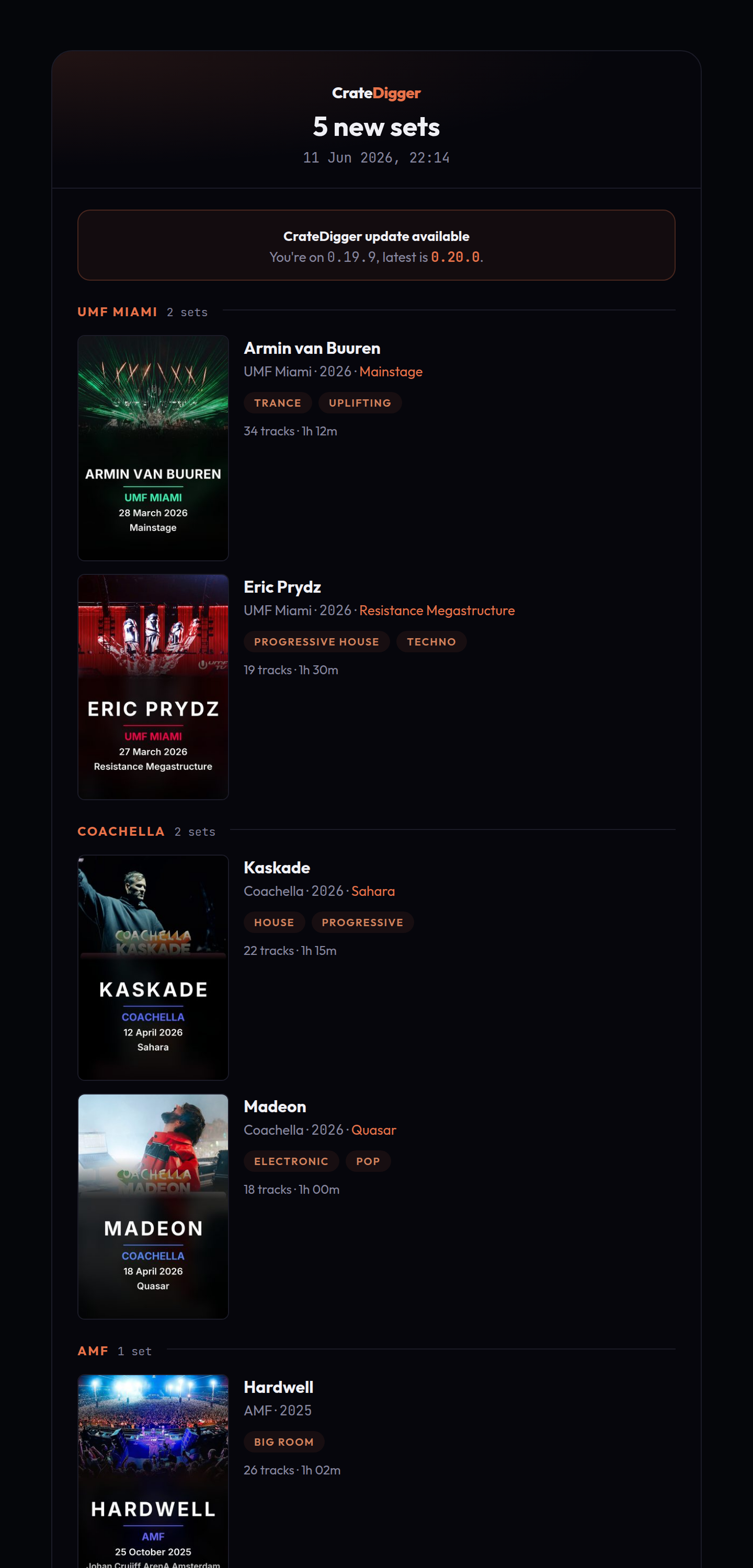
CrateDigger can send HTML run-summary emails after key commands. Emails are sent only when there is something to report; a run that changes nothing sends nothing (except possibly the throttled update reminder described below). Each message includes inline poster thumbnails and a plain-text fallback. No external dependencies are required; emails are sent using Python's standard library over SMTP.
There are three independent channels. Each has its own recipient list and can be enabled or disabled separately.
| Channel | Trigger | Typical recipients |
|---|---|---|
new_sets |
After organize, when one or more sets were newly added to the library |
You and anyone else who follows the collection |
updated_sets |
After identify, when chapters were added or changed on one or more sets |
You only |
update_reminder |
After any command, when a newer CrateDigger version is available | You only |
The update_reminder channel is throttled: you receive at most one email per new release, not one per run. When a content email (new_sets or updated_sets) goes out in the same run, the update banner is embedded in that email instead and the standalone reminder is suppressed.
The email step runs after the command finishes and reports its progress on the console: a spinner shows the slow phases (resizing a thumbnail for every set, sending), followed by a one-line verdict such as New-sets email -> sent to 2 recipients or, on failure, Email -> send failed (...). Runs that send nothing stay silent in normal mode.
Prerequisites
You need an SMTP server that accepts authenticated submissions. A local relay, a self-hosted mail server, or any provider that supports STARTTLS or SSL on port 587/465 works. Gmail, Fastmail, and similar providers work if you generate an app password.
Configuration
[email]
smtp_host = "mail.example.lan"
smtp_port = 587
smtp_security = "starttls"   # starttls | ssl | none
smtp_user = "cratedigger"
smtp_password = ""           # leave blank; use CRATEDIGGER_SMTP_PASSWORD instead
from_address = "cratedigger@example.lan"
thumbnail_width = 140

[email.new_sets]
enabled = true
to = ["you@example.com", "other@example.com"]

[email.updated_sets]
enabled = true
to = ["you@example.com"]

[email.update_reminder]
enabled = true
to = ["you@example.com"]
| Key | Description | Default |
|---|---|---|
smtp_host |
SMTP server hostname or IP | (required) |
smtp_port |
SMTP port | 587 |
smtp_security |
Connection security: "starttls", "ssl", or "none" |
"starttls" |
smtp_user |
SMTP login username | (required) |
smtp_password |
SMTP password (see env var note below) | "" |
from_address |
Sender address that appears in the From header | (required) |
thumbnail_width |
Width in pixels of embedded poster thumbnails | 140 |
Each channel sub-table ([email.new_sets], [email.updated_sets], [email.update_reminder]) has two keys:
| Key | Description |
|---|---|
enabled |
Set to true to enable this channel |
to |
List of recipient addresses |
SMTP password
Set the password via the CRATEDIGGER_SMTP_PASSWORD environment variable rather than writing it into config.toml. The environment variable takes precedence over smtp_password in the config file and is never written to logs.
Verifying delivery
Run cratedigger --email-test to send a sample email and confirm your SMTP settings and rendering work. It takes no path, does not touch your library, and reports whether the message was sent or why it failed (for example, no recipients configured, or a connection error). It sends to the [email.new_sets] recipient list and works even while that channel is disabled, so you can test before turning it on.
You can also force or suppress an email for a single run without changing your config:
--emailonorganizeforces thenew_setsemail even if no sets were added.--no-emailonorganizeoridentifysuppresses the email for that run.
See organize options and identify options.
Example
NFO settings
Genre written into NFO files when no genre is available from 1001Tracklists metadata. genre_festival applies to festival sets; genre_concert applies to concert recordings.
Tool paths
# [tool_paths]
# ffprobe = "C:/Program Files/ffmpeg/bin/ffprobe.exe"
# mkvextract = ""
# mkvpropedit = ""
# mkvmerge = ""
Explicit paths to external tools. Set these only if the tools are installed somewhere not on your system PATH. Omit a key (or leave an empty string) to let CrateDigger find them automatically via PATH.
Cache TTL
Base lifetimes for CrateDigger's caches, in days. When a cache entry expires, CrateDigger refreshes it on the next lookup.
| Key | What it controls | Default |
|---|---|---|
mbid_days |
MusicBrainz ID cache | 90 |
dj_days |
DJ name and alias cache | 90 |
source_days |
Source and venue name cache | 365 |
images_days |
Downloaded artwork and images | 90 |
Each entry's actual lifetime jitters by ±20% around the base value (for example, mbid_days: 90 means entries live 72 to 108 days). This prevents all cached entries from expiring at the same time after a bulk first-run fill, which would cause a large number of network requests in one go.
External config files
Three JSON files can live alongside your config.toml and control name resolution. They use the same location as your config file:
| Platform | Folder |
|---|---|
| Linux | ~/CrateDigger/ |
| macOS | ~/CrateDigger/ |
| Windows | Documents\CrateDigger\ |
places.json
Controls place name recognition, aliases, and editions. Places include festivals, clubs, venues, and any other named entities that host DJ sets in your library. CrateDigger includes built-in place knowledge. To add your own entries or customize aliases, place a places.json in the folder above. See Places for the file format and how to add entries.
Curated assets directory: logo images for each place go in .cratedigger/places/<canonical-name>/logo.<ext> inside your library, or in places/<canonical-name>/logo.<ext> under the folder above for logos shared across every library. Edition-specific logos live in a sibling folder named after the edition display name, places/<canonical-name> <edition>/logo.<ext> (for example places/EDC Las Vegas/), not in a subfolder of the canonical name. CrateDigger tries the edition folder first, then the canonical name, and checks the library-local location before the shared one. Accepted extensions are jpg, jpeg, png, and webp.
Legacy file: festivals.json was renamed to places.json in 0.15.0, and nothing reads festivals.json when looking up a place. On startup, if the folder above still holds a festivals.json and has no places.json, CrateDigger copies the old file to places.json once. The copy happens before logging starts, so nothing is printed about it; check that places.json exists in the folder above to confirm it ran. The original file is left untouched, so you can delete it once the copy is in place. Only this shared folder is migrated: a library-local .cratedigger/festivals.json is never copied and never read, so rename that one yourself.
artists.json
Controls artist name aliases and B2B group definitions.
Place it in the folder above (~/CrateDigger/artists.json on Linux or macOS, Documents\CrateDigger\artists.json on Windows). Example:
{
    "aliases": {
        "Armin van Buuren": ["Rising Star"],
        "Martin Garrix": ["GRX"],
        "Nicky Romero": ["Monocule"]
    },
    "groups": [
        "Above & Beyond",
        "Swedish House Mafia",
        "W&W"
    ]
}
aliases: maps a canonical artist name to a list of aliases. When CrateDigger encounters an alias in a filename or tag, it substitutes the canonical name. Matching is case-insensitive and diacritics-insensitive.
groups: a manual list of act names that should be kept as-is even when they contain &, B2B, vs., or x separators. As of v0.21.0, any act with a 1001Tracklists profile is kept whole automatically (resolved to its canonical name via the DJ cache), so you do not need a manual entry for those acts. This includes single acts whose name contains & (for example, "Above & Beyond") and named groups (for example, "Swedish House Mafia"). Manual entries are mainly useful for acts with no 1001Tracklists profile (for example, "W&W" if it has no profile) or to correct a name the DJ cache gets wrong. When an act is neither in groups nor known to 1001Tracklists, CrateDigger splits on the separator and uses only the first artist as the folder name.
Artist MBID override file
artist_mbids.json is a flat JSON map from artist display name to MusicBrainz artist ID. It lives in the same folder as your config file:
| Platform | Path |
|---|---|
| Linux | ~/CrateDigger/artist_mbids.json |
| macOS | ~/CrateDigger/artist_mbids.json |
| Windows | Documents\CrateDigger\artist_mbids.json |
It is checked first by both the chapter_artist_mbids and album_artist_mbids enrich operations, before the auto cache and any live MusicBrainz search.
{
    "Afrojack": "3abb6f9f-5b6a-4f1f-8a2d-1111111111aa",
    "Oliver Heldens": "6e7dde91-4c02-47ea-a2b4-2222222222bb"
}
| Property | Value |
|---|---|
| Format | Flat JSON object: {"Artist Name": "mbid-uuid"} |
| Matching | Case-insensitive on the artist name |
| Precedence | Checked before the auto MBID cache and before any live MusicBrainz search |
| Expiry | Never expires |
| Written by CrateDigger | No; this file is only edited by you |
Distinction from the auto MBID cache: the auto cache is populated from MusicBrainz search results and expires after cache_ttl.mbid_days. It can be deleted and will refill. artist_mbids.json is your curated override list for artists that MusicBrainz searches misidentify or fail to find.
When a lookup fails: a search that finds nothing is remembered as a miss until the TTL expires, so CrateDigger does not re-query the same unknown name on every run. Two things are deliberately excluded from that. A lookup that could not be completed at all (MusicBrainz returning 503 after its retries) is never remembered, so a temporary outage cannot pin an artist to "no ID" for the next 90 days; it is logged as a warning and retried on the following run. And remembered misses are discarded automatically whenever the matching logic improves, so artists that a previous version could not resolve are looked up again rather than waiting out the TTL.
See enrich: chapter_artist_mbids for the fix workflow.
Environment variables
| Variable | Overrides |
|---|---|
CRATEDIGGER_DATA_DIR |
Default data directory for config, places, artists, and logos. Must point at an existing directory. See Custom data directory. |
TRACKLISTS_EMAIL |
tracklists.email |
TRACKLISTS_PASSWORD |
tracklists.password |
FANART_PROJECT_API_KEY |
Built-in fanart.tv project key |
FANART_PERSONAL_API_KEY |
fanart.personal_api_key |
KODI_HOST |
kodi.host |
KODI_PORT |
kodi.port |
KODI_USERNAME |
kodi.username |
KODI_PASSWORD |
kodi.password |
CRATEDIGGER_SMTP_PASSWORD |
email.smtp_password (takes precedence; preferred over storing the password in the config file) |