Power control
Read this page before enabling anything on it
Once control is enabled, any Domoticz user, scene, timer or API client with access to this hardware can power off the server. Domoticz has no per-device permission model that would stop that.
Control is off by default. With Allow Control set to No, the plugin is strictly read-only: no control device is created at all, and any command that somehow arrives is refused and logged.
The two gates
There are two separate settings, and they answer different questions.
| Setting | Question it answers |
|---|---|
| Allow Control | May Domoticz touch power at all? |
| Allow Force Off and Power Cycle | May it use the destructive kind? |
The second is meaningless on its own. With Allow Control off, nothing is created and nothing runs regardless of how the second is set.
What enabling control creates
Setting Allow Control to Yes creates two devices.
Power Control
A selector switch with five permanent entries:
| Level | Entry | Sent to the server as | Needs the hard-power setting? |
|---|---|---|---|
| 10 | Power On | On |
no |
| 20 | Graceful Shutdown | GracefulShutdown |
no |
| 30 | Graceful Restart | GracefulRestart |
no |
| 40 | Force Off | ForceOff |
yes |
| 50 | Power Cycle | PowerCycle |
yes |
Entries the server is not currently offering, or that the hard-power setting withholds, are shown as Force Off (unavailable) rather than being removed from the menu.
Why unavailable entries stay in the list
Domoticz stores a selector's level number inside scenes, timers and scripts, and replays them for years. If the menu were built only from whatever the server happens to offer right now, dropping one action would shift everything after it down a slot, and a saved automation meaning Graceful Restart would come to mean Force Off. Redfish explicitly permits the offered set to vary, so every action owns a permanent slot and availability is enforced when the command arrives instead.
Nmi is deliberately absent from the table entirely. It crashes the host on purpose and is not something a scene or timer should be able to reach.
Identify LED
A switch that toggles the chassis identify light, for finding the machine in a rack.
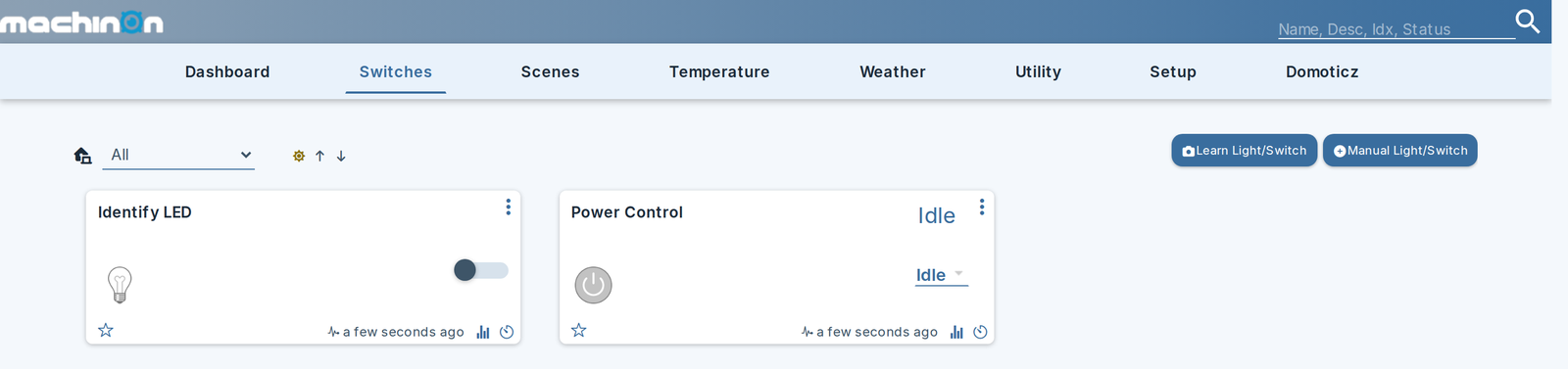
The switch moves as soon as the iDRAC accepts the command, rather than waiting for the next poll. Chassis state is only re-read on the slow tier, so without that the switch would spring back to its old position for up to several minutes and look as though the click had been ignored.
If the command fails, the log says so and the switch stays where it was:
Graceful versus hard
Graceful Shutdown and Graceful Restart are requests handed to the host operating system, which can flush disks, close files and stop services first.
Force Off and Power Cycle cut power electrically with no warning. This is the equivalent of holding the power button in, and it can lose unwritten data or corrupt a filesystem. Leave them off unless you specifically need them.
Graceful actions are fire-and-forget
The iDRAC accepts a graceful request and returns success even when there is no operating system or agent there to act on it. Nothing in the response tells you whether anything happened.
The plugin therefore logs:
accepted, not succeeded. Watch the Power State device to see what actually happened.
Dell's own reference scripts handle this by polling power state afterwards and escalating to a forced power-off after five minutes. This plugin deliberately does not do that. A monitoring plugin force-killing a server because a graceful request went unanswered is a destructive surprise nobody asked for. If you want that behaviour, build it as a Domoticz scene or script where it is visible and yours.
Requirements on the iDRAC side
The account needs Server Control privilege. A read-only account is fine for monitoring but its power commands will be refused, which shows up as:
A command the plugin itself refuses, before anything is sent, reads differently and names why:
Error: Dell iDRAC Monitor: power command refused: ForceOff is not currently available
(server-advertised=True, hard actions allowed=False)
What control does not change
Enabling control does not make the plugin write anything else to your server. The only other setting that writes is Configure iDRAC telemetry, which is independent of this page and is covered under Settings. See Security for the full list of requests the plugin can make.
Turning control back off
Setting Allow Control to No stops the plugin from offering or executing anything: every command is refused at the guard, so no power action can get through.
The two devices stay visible
The Power Control selector and Identify LED are not deleted when you turn control off. They remain on your dashboard and remain clickable, and give no visual sign that they are now inert. Nothing can leak through them, but if you want them gone, delete them under Setup then Devices.