Devices
After you sign in, every appliance on your Home Connect account gets its own set of devices. Each device is named after the appliance (the name you gave it in the Home Connect app), followed by what it shows, for example "Washer Remaining time" or, in Dutch, "Wasautomaat Resterende tijd".
Every device also has a description (open the device's edit dialog) that explains what it shows, in the device language.
The devices every appliance gets
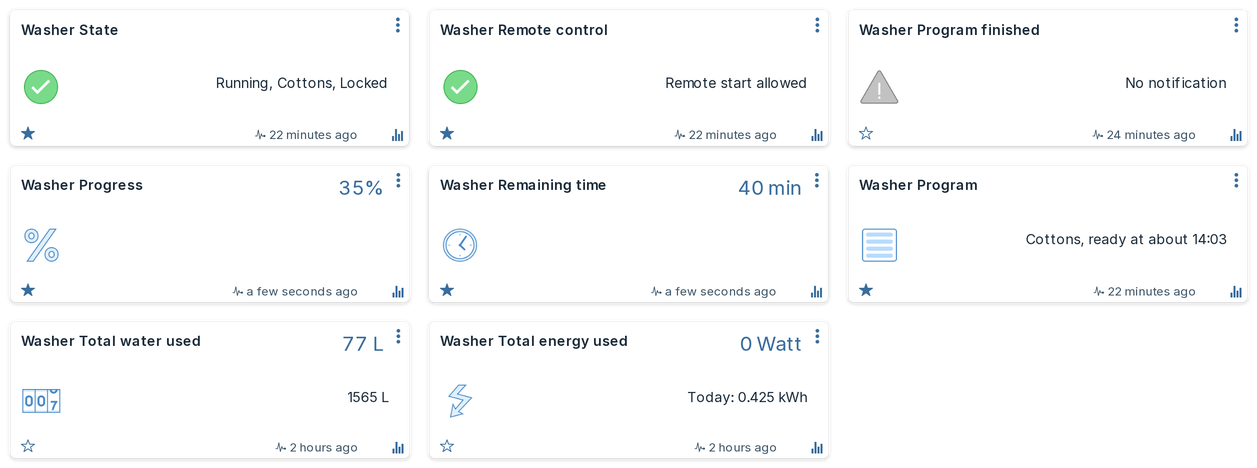
Which theme is this?
The screenshots show the Machinon theme for Domoticz. The plugin works the same with any theme.
Not every appliance has all of these: a fridge has no programs, so it gets no program devices, and a hob can be monitored but not started.
| Device (English / Nederlands) | Type | What it shows |
|---|---|---|
| State / Status | Alert | What the appliance is doing, with the program: for example "Running, Cotton". Grey when idle or offline, green while running or waiting for a delayed start, yellow when paused, finished or aborting, orange when it needs you, red on an error. |
| Power / Aan/uit | Switch | Whether the appliance is on. Many appliances (washers, dryers, fridges) cannot be switched off remotely; switching them off is refused. |
| Door / Deur | Door contact | Open or closed. A locked door counts as closed; "Locked" then also shows in State. |
| Progress / Voortgang | Percentage | How far the running program is. |
| Remaining time / Resterende tijd | Number (min) | Minutes until the program ends. For an oven program without a set duration, the time it has been running instead. |
| Program / Programma | Text | The running program and when it will be ready, for example "Cotton, ready at 14:35". "about" means the appliance estimates the time. |
| Remote control / Bediening op afstand | Alert | Whether Domoticz may start the appliance: "Local operation", "Remote control off", "Remote control on" or "Remote start allowed". |
| Program choice / Programmakeuze | Selector | The selected program; with Allow control on, choosing one here selects it on the appliance. |
| Actions / Acties | Selector | Start, Stop, Pause, Resume, and on an oven with a motorised door Open door and Partly open door. An action the appliance does not support is refused. Only with Allow control on. |
| Acknowledge / Bevestigen | Push button | Confirms a message on the appliance. Only with Allow control on, and only where the appliance offers it. |
| Start at or Ready at / Start om of Klaar om | Selector | A clock time for a delayed start. Only with Allow control on. See Control. |
| Status code / Statuscode | Selector | The state as a fixed number for scripts (below). Its name starts with "$", which keeps it off the dashboard. |
Program or Program choice? Program choice is the program that is selected (on the appliance or from Domoticz), which is what Start will run; with Allow control on you change it there. Program is a read-only summary: while a program runs it shows that program and when it will be ready, and before that it shows the selected program marked "(selected)".
Status code for scripts
Device names and state texts depend on the language. The Status code device gives each state a level that never changes, so a script can rely on it:
| Level | State |
|---|---|
| 10 | Inactive |
| 20 | Ready |
| 30 | Delayed start |
| 40 | Running |
| 50 | Paused |
| 60 | Action required |
| 70 | Finished |
| 80 | Aborting |
| 90 | Error |
| 100 | Offline |
The device is named with a leading "$", for example "$Washer Status code". Domoticz leaves a device whose name starts with "$" off the dashboard, while dzVents and Lua scripts read it and trigger on it as usual. To see it on the dashboard, rename it without the "$".
Installed 0.1.0-beta.2 or earlier? There the device was created as not used, and dzVents and Lua do not reliably see a device that is not used. Under Setup > Devices, filter on the hardware and add the Status code device with the green arrow. The plugin gives it the "$" name by itself, unless you renamed it.
Options, settings and other values
Besides the devices above, the plugin creates a device for each value an appliance reports:
- Program options such as temperature, spin speed or duration. An option you can change is a setpoint, selector or switch; one you cannot change only shows its value. Changing one works only with Allow control on. Durations are shown and entered in minutes, even though Home Connect works in seconds.
- Appliance settings such as child lock or a fridge temperature. These are created hidden, except a fridge's or freezer's temperature setpoints and super modes, which are how you operate those appliances.
- Status values such as the oven cavity temperature or an energy forecast.
- Messages (events) such as "Program finished", "Rinse aid nearly empty" or "Preheat finished", each as an alert device that lights up while the message is active and clears when it ends.
Values the plugin has no name for (Home Connect adds new ones over time) get the name Home Connect sends, and their devices are created hidden.
Where are the hidden devices? Under Setup > Devices. Filter on the hardware, and use the green arrow on a device to add it to the dashboard. Scripts (dzVents, Lua) only reliably see a device once it is added: a hidden device is not used, and Domoticz does not load it for scripts. To give a script a device without putting it on the dashboard, add it and rename it with a leading "$".
Washing machine meters
A washing machine reports four lifetime totals at the end of each program. The plugin shows them as Domoticz meters, so Domoticz's log graphs show the use per day, month and year. Another appliance that reports the same energy or water totals gets the same meters; so far only washing machines are known to do so.
| Device | Meter | Unit |
|---|---|---|
| Total energy used / Totaal energieverbruik | Energy (kWh) | kWh |
| Total water used / Totaal waterverbruik | Counter | litres |
| Total detergent / Totaal wasmiddel | Counter | ml |
| Total softener / Totaal wasverzachter | Counter | ml |
Good to know:
- A meter appears the first time the washer reports that total, at the end of a program. Energy and water come with every program; detergent and softener only with a program that doses them, so those two can appear later.
- The use lands in the hour the program ended, not spread over the run.
- The energy meter always shows 0 W: Home Connect reports energy used, not live power.
When the appliance or the connection is away
- An appliance that is switched off at the mains or has lost Wi-Fi shows Offline in State, and its other devices keep their last values.
- When the plugin has not heard from Home Connect for more than 5 minutes, State adds "(last known)". It disappears at the next update.
- Devices are never deleted by the plugin. An appliance you remove from your Home Connect account keeps its devices in Domoticz until you delete them.