Scans
After setup MetaMender works on its own, in the background. This page explains when it looks at your library, how often it checks a field again, and what you see while it works.
When MetaMender scans
- Every day. A background scan runs once every 24 hours (change this with Scan interval (hours) in the settings). The first one starts when Kodi starts.
- After a library update. When Kodi finishes updating or cleaning the video library, MetaMender waits five minutes and then looks at the items that are new to it. A scheduled scan that is due at the same time covers them anyway.
- When you ask. Update now refreshes one movie, show, season or episode right away.
A scan does not start while a video plays, and a scan that is running pauses when you start a video and carries on when you stop. If Kodi closes in the middle of a scan, the next one continues where it left off (switch this off with Resume interrupted scans).
How often a field is checked
MetaMender does not fetch everything every day. It remembers, per item and per field, when it last checked and when the next check is due:
- The first check happens at the first scan that sees the item.
- New movies and episodes change most: a score has few votes at first, and plots and episode titles are often added after release. MetaMender checks them again after about a week, then about a month later, then about three months later, and once more when the item is a year old.
- After that the field is settled and MetaMender leaves it alone. Content that is already more than a year old is settled after its first check.
So a score that was 9.4 from 12 votes in an episode's first week gets refreshed while the votes come in, instead of staying 9.4 forever.
Some exceptions:
- Age ratings from a real source (TMDB or the official site for your country) are settled after one answer: they do not change. An age rating MetaMender had to work out from another country's rating is checked again every month for about a year, in case the real one appears.
- A text from the fallback language is checked again every month for about a year, so a version in your own language replaces it when one appears.
- A field MetaMender could not check (a site did not answer) is tried again at the next scan; a failed check never counts as a check.
The exact schedule is in the settings: Staleness threshold (days) (the one year) and Refresh schedule (days) (the week, month and three months; shown at the Advanced settings level). The Details window shows, per field, when it was last checked and when it is due next.
What you see
Nothing, most of the time. MetaMender is quiet on purpose:
- While anything plays, video or music, MetaMender shows nothing at all.
- After a background scan that changed something, a small notification says how many items were updated. A scan that changed nothing shows nothing. Switch these off with Show notifications.
- When something needs you, a window says so, whatever the notification setting.
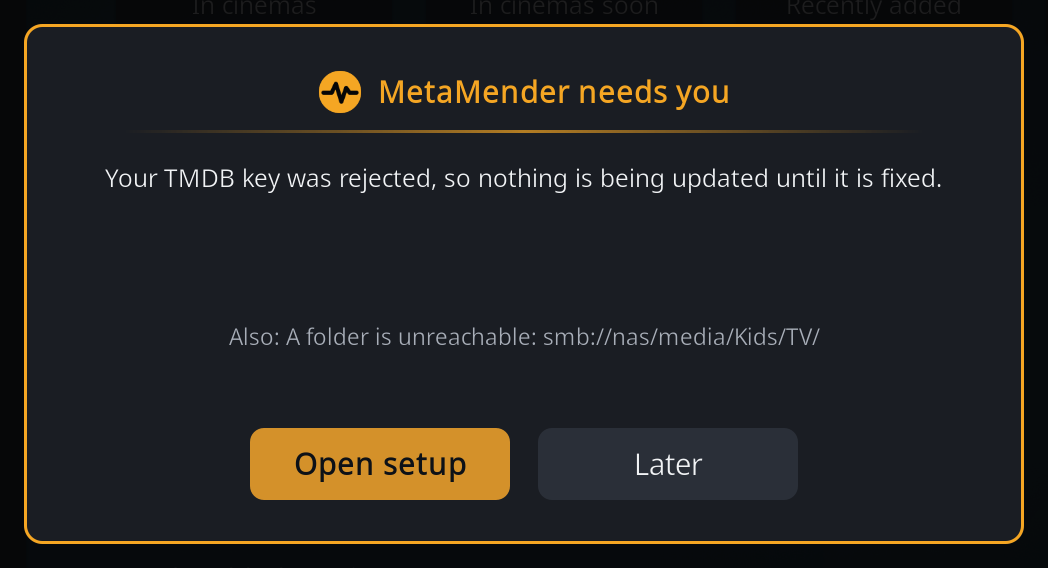
The MetaMender needs you window appears, when nothing plays, for these problems:
| The window says | What to do |
|---|---|
| Setup has not been finished yet | Choose Open setup and finish it. Nothing is updated before that. |
| There is no TMDB key | Choose Open setup and enter your key. |
| Your TMDB key was rejected | Choose Open setup and enter the key again; check that it is the API Key, not the Read Access Token. |
| The last background scans did not finish | Background scans failed at least three times over at least a day. The log has the details (see Troubleshooting). |
| A folder is unreachable | A library folder has been unreachable for three days or more, for example a network share that is off. Its items are not updated until it is back. |
When there is more than one problem, the most important one is shown and the others are listed under Also. Later closes the window; it does not come back for the same problem, but does for a new one.
If TheTVDB stops accepting MetaMender's own key, a notification says so once. Titles and plots from TheTVDB are paused until it works again; TMDB carries on.