Random-Order Shows
Configured under Settings → Shows → Random Episode Order → Select shows for random order...
Some TV shows don't need to be watched in order. Sitcoms, cartoons, sketch comedy, anthology series: these are "shuffle-friendly" shows where any episode works.
EasyTV lets you mark these shows for random episode selection instead of sequential viewing.
What Are Random-Order Shows?
For most shows, EasyTV tracks your progress and plays the next episode in sequence: - You watch Breaking Bad S02E05 - EasyTV suggests S02E06
For random-order shows, EasyTV picks any available episode: - You're watching The Simpsons - EasyTV picks a random unwatched episode (maybe S08E14, then S03E07, then S15E02)
Good Candidates for Random Order
| Show Type | Examples | Why Random Works |
|---|---|---|
| Sitcoms | Friends, Seinfeld, The Office | Episodes are mostly standalone |
| Cartoons | The Simpsons, Family Guy, South Park | Self-contained stories |
| Sketch Comedy | SNL, Key & Peele, MadTV | No continuity between episodes |
| Anthology Series | Black Mirror, Twilight Zone | Each episode is independent |
| Reality/Competition | Chopped, Forged in Fire | Episodes don't build on each other |
| Late Night | Talk shows, variety shows | Standalone episodes |
Configuring Random-Order Shows
Adding Shows to Random Order
- Go to Settings → Shows → Random Episode Order
- Click Select shows for random order...
- A selection dialog opens with all your TV shows
- Check the shows you want to randomize
- Click Save
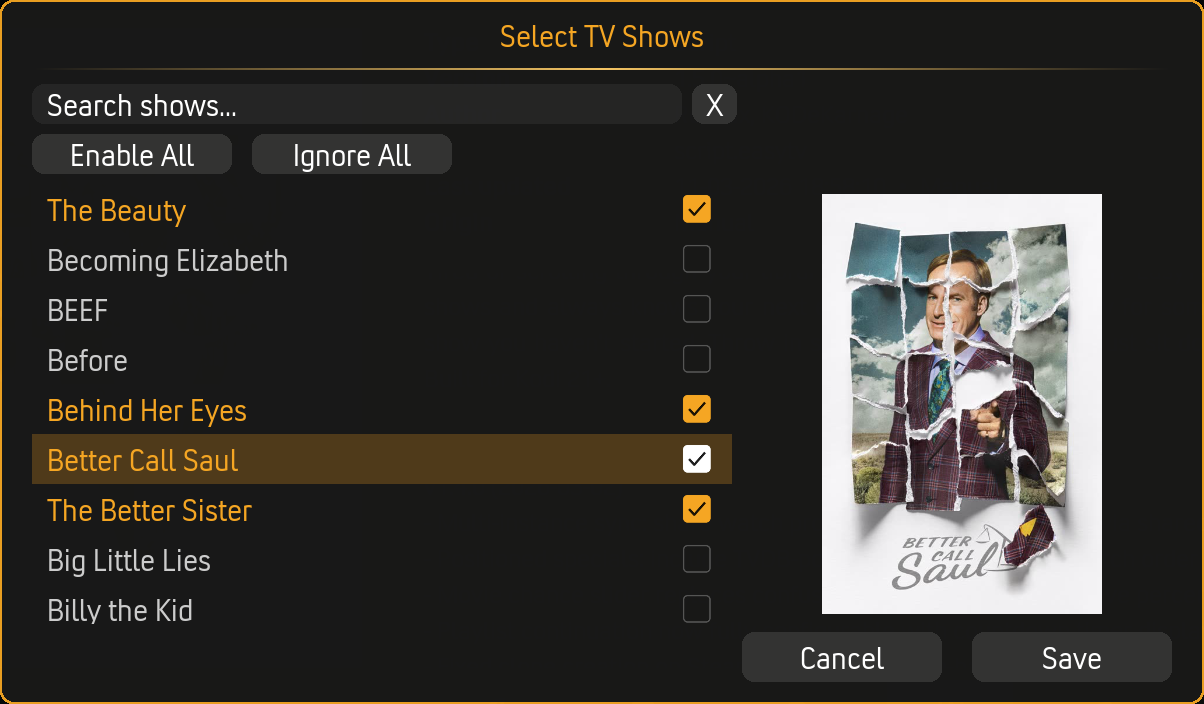
Removing Shows from Random Order
- Same path: Settings → Shows → Random Episode Order
- Click Select shows for random order...
- Uncheck shows you want to return to sequential order
- Click Save
Display
The settings show how many shows are marked for random order: - "3 shows selected" (or however many) - "No shows selected" if none
Random-Order Shows Are a Subset of Your Included Shows
Random-order is not a separate list of shows that plays alongside a "sequential" list. It is a flag on shows EasyTV already includes. Marking a show for random order only changes how its episodes are picked (randomly instead of in sequence). It does not, by itself, add the show to EasyTV.
This only matters if you turn on the show filter (Settings → Shows → Show Filter → "Use only selected shows"):
- Filter off (the default): EasyTV uses your whole library, so any show you mark for random order is already included and will play.
- Filter on: EasyTV uses only the shows you picked under "Select shows...". A show marked for random order that is not in that included list is left out entirely; the random-order flag does not pull it back in.
So when the filter is on, a random-order show must be in both places:
- Included under Show Filter → Select shows...
- Marked under Random Episode Order → Select shows for random order...
If you marked a show for random order and it never appears, this mismatch is the most common cause.
How Random Order Works
In Browse Mode
When a random-order show appears in the episode list: - The displayed episode is random (not necessarily the "next" one) - Each time you refresh, it may show a different episode - Clicking plays that random episode
In Random Playlist
When a random-order show is picked for the playlist: - A random unwatched episode is selected - Not the sequential "next" episode
Episode Pool
Random selection draws from: - Unwatched mode: All unwatched episodes - Watched mode: All watched episodes - Both mode: Mix based on your ratio setting
Interaction with Episode Selection
The Episode selection setting (Unwatched/Watched/Both) affects random-order shows differently than sequential shows:
Unwatched Only
| Sequential Shows | Random-Order Shows |
|---|---|
| Next episode in order (S02E06) | Random unwatched episode |
| Progress advances linearly | Progress is scattered |
Both kinds of shows draw only from unwatched episodes. The difference is which unwatched episode is picked.
Watched Only
| Sequential Shows | Random-Order Shows |
|---|---|
| Random rewatch | Random rewatch |
| Same behavior | Same behavior |
No difference. Both pick randomly from watched episodes.
Both (Mixed)
| Sequential Shows | Random-Order Shows |
|---|---|
| Unwatched: Next in order | Unwatched: Random unwatched |
| Watched: Random rewatch | Watched: Random rewatch |
The "Unwatched episode chance" slider applies to both: - 80% chance = mostly unwatched content - For sequential: 80% chance of next episode, 20% chance of random rewatch - For random-order: 80% chance of random unwatched, 20% chance of random rewatch
Hiding from Browse Mode
If you only want random-order shows in random playlists (not the browse list):
- Go to Settings → Browse Mode → Appearance
- Enable Hide random-order shows
When enabled: - Random-order shows don't appear in the episode list - They still appear in random playlists - Useful for shows you never manually pick
Multiple Episodes Per Show
When Allow multiple episodes of same TV Show is enabled in Random Playlist settings:
Sequential Shows
- First appearance: S02E06
- Second appearance: S02E07
- Third appearance: S02E08
Random-Order Shows
- First appearance: Random episode A
- Second appearance: Random episode B (different from A)
- Third appearance: Random episode C (different from A and B)
Each appearance picks a different random episode (avoiding repeats within the playlist).
Immediate Effect
When you add a show to random order: - The change takes effect immediately - In Browse Mode, the episode display updates on next refresh - In Random Playlist, the next playlist uses random selection
When you remove a show from random order: - EasyTV returns to sequential tracking - It resumes from where you left off in the sequence
Use Case Examples
"Background Simpsons"
- Add The Simpsons to random-order shows
- Set EasyTV to Random Playlist mode
- Include only The Simpsons (via show filter)
- Launch and let random episodes play
"Mixed Comedy Night"
- Add sitcoms to random-order shows (Friends, Seinfeld, Parks & Rec)
- Keep drama shows sequential
- Use smart playlist filter for Comedy genre
- Random playlist mixes random sitcom episodes
"Anthology Exploration"
- Add Black Mirror to random-order shows
- Every episode is independent anyway
- Let EasyTV pick which story you watch next
"Kids Cartoon Channel"
- Create EasyTV clone called "Kids TV"
- Open the clone's own settings and add all cartoons to its random-order shows list
- Filter to Animation genre (using the clone's own show filter)
- Set to Random Playlist on launch
- Kids press one button, random cartoons play
The clone uses its own random-order shows list, configured under its own settings. This list is separate from the main addon's and does not inherit from it. Any changes to the main addon's random-order shows do not affect the clone, and vice versa.
Multi-Instance Sync Note
If you use multi-instance sync, configure your random-order shows identically on all devices. Random-order shows pick a different episode than sequential shows, so mismatched selections will cause devices to disagree on the next episode for affected shows.
Technical Details
What Gets Randomized
- Episode selection within a show
- NOT show selection (that's separate randomization in playlist building)
Playback Tracking
- Watched episodes are still tracked normally
- Resume points work the same
- Progress just doesn't follow sequential order
Multi-Episode in Both Mode
When using "Both" with "Allow multiple episodes" enabled, random-order shows in lazy queue mode: - Each appearance recalculates which random episode to pick - Avoids repeating the same episode within one playlist - Respects the unwatched/watched ratio
Troubleshooting
Show Still Playing Sequentially
- Verify the show is checked in the random-order selection
- Refresh the browse list or generate a new playlist
- Check that you clicked "Save" after selecting
Same Episode Keeps Appearing
- This can happen if you have very few unwatched episodes
- The pool of available episodes determines randomness
- Check your Episode Selection setting (Unwatched vs Both)
Random-Order Show Missing from List
- Check if "Hide random-order shows" is enabled in Browse Mode settings
- The show should still appear in random playlists
- If you use the show filter ("Use only selected shows"), confirm the show is also included under Show Filter → Select shows.... Random-order shows are a subset of your included shows, so a show that is marked random-order but not included is left out entirely (see Random-Order Shows Are a Subset of Your Included Shows)
Related Pages
- Browse Mode: How random-order shows appear in the list
- Random Playlist Mode: How random-order affects playlists
- Settings Reference: All related settings
- Smart Playlist Integration: Combine with genre filtering