Random Playlist Mode
Random Playlist Mode creates a shuffled playlist of episodes (and optionally movies) from your library. One click and playback starts immediately. Perfect for eliminating decision fatigue.
Now Playing: The Office S04E01 - Fun Run

Up Next:
  1. Breaking Bad S02E03
  2. Fargo (2014 film)
  3. Better Call Saul S01E01
  4. Parks and Recreation S03E12
  5. The Sopranos S03E08
How It Works
- EasyTV gathers candidates: Your shows (and optionally movies) based on settings
- Builds a shuffled playlist: Randomizes the order
- Prioritizes partials: Unfinished content moves to the front
- Starts playback: First item plays immediately
- Continues automatically: Playlist plays through without interaction
Playlist Content
Choose what goes in your playlist. Settings → Random Playlist → Basics → Playlist content
| Option | Content |
|---|---|
| TV episodes only | Only TV show episodes |
| TV and movies | Mix of episodes and movies |
| Movies only | Only movies, no TV |
Playlist Length
Settings → Random Playlist → Basics → Playlist length
Set how many items (episodes + movies) appear in the playlist. Range: 1-50.
Tip: Shorter playlists (5-10) work well for casual viewing. Longer playlists (20+) are great for background watching.
Episode Selection
Control which TV episodes are included. Settings → Random Playlist → Content Options → Episode selection
| Option | Episodes Included | Behavior |
|---|---|---|
| Unwatched only | Only unwatched episodes | Plays your "next" episode for each show |
| Watched only | Only watched episodes | Random rewatches from your history |
| Both | Unwatched and watched | Mix of new and rewatches |
Unwatched Episode Chance
When using Both, this slider controls the mix. Settings → Random Playlist → Content Options → Unwatched episode chance
| Value | Result |
|---|---|
| 100% | Always pick unwatched (same as "Unwatched only") |
| 80% | Mostly new episodes, occasional rewatches |
| 50% | Equal chance of new or rewatch |
| 20% | Mostly rewatches, occasional new episode |
| 0% | Always pick watched (same as "Watched only") |
Note: Unwatched episodes always play in order (your next on-deck episode). Watched episodes are picked randomly from your watch history.
Movie Options
When Playlist content includes movies:
Movie Selection
Settings → Random Playlist → Content Options → Movie selection
| Option | Movies Included |
|---|---|
| Unwatched only | Movies you haven't seen |
| Watched only | Movies you've already watched |
| Both | Mix of new and rewatches |
Movie Chance
Settings → Random Playlist → Content Options → Movie chance
Controls the percentage of the playlist devoted to movies (only for "TV and movies" mode).
| Value | Result (20-item playlist) |
|---|---|
| 0% | No movies (TV only) |
| 10% | ~2 movies |
| 25% | ~5 movies (default) |
| 50% | ~10 movies (equal mix) |
| 75% | ~15 movies |
| 100% | All movies |
Movies are spread randomly through the playlist rather than grouped, so a 10% mix on a 20-item playlist puts its two movies at two random positions, not at the end. The count itself is fixed: the playlist always lands on the target number of movies as long as enough matching movies exist.
Start Watched Movies at Random Point
Settings → Random Playlist → Content Options → Start watched movies at random point
When enabled, watched movies start playing at a random point (5-75% through), like catching a movie already in progress on TV.
Only available when Movie selection includes watched movies.
Filter Movies by Playlist
Settings → Random Playlist → Content Options → Filter movies by playlist...
Use a Kodi smart playlist to limit which movies are included. Click to select a .xsp file.
Examples: - Only comedies - Only movies from the 90s - Only highly-rated films
See Smart Playlist Examples for ready-to-use filters.
Partial Content Prioritization
EasyTV can move unfinished content to the front of your playlist, so you finish what you started.
TV Episodes
Settings → Random Playlist → Content Options → Start playlist with unfinished episodes
When enabled: - Episodes you've partially watched are identified - They're moved to the beginning of the playlist - Sorted by recency (most recently watched first)
Movies
Settings → Random Playlist → Content Options → Start playlist with unfinished movies
Same behavior for partially watched movies.
How Prioritization Works
- All partials are gathered: Every partially watched item matching your selection filters
- Sorted by recency: Most recently watched items first
- Same-show order preserved: If you have two partial episodes from the same show, they stay in episode order
- Moved to front: Partials become the first items in the playlist
- Random content follows: Shuffled content fills the rest
Example: You have: - Breaking Bad S02E05 (partial, watched yesterday) - Inception (partial, watched 3 days ago) - The Office S04E01 (partial, watched last week)
With both partial settings enabled, your playlist starts:
1. Breaking Bad S02E05     ← Most recent partial
2. Inception               ← Second most recent
3. The Office S04E01       ← Oldest partial
4. [random content...]     ← Shuffled remaining items
Resume Point Seeking
Control whether EasyTV automatically skips to where you left off.
For TV Episodes
Settings → Random Playlist → Content Options → Seek to resume point for episodes
| Setting | Behavior |
|---|---|
| On | Partial episodes resume where you stopped |
| Off | Partial episodes start from the beginning |
For Movies
Settings → Random Playlist → Content Options → Seek to resume point for movies
Same behavior for movies.
Catch-up buffer: When resuming, EasyTV seeks to 10 seconds before your last position. This gives you a moment to remember where you were before the action continues.
Note: These settings work independently from partial prioritization. You can prioritize partials without auto-seeking, or vice versa.
Multiple Episodes Per Show
Settings → Random Playlist → Basics → Allow multiple episodes of same TV Show
| Setting | Behavior |
|---|---|
| Off | Each show appears at most once in the playlist |
| On | The same show can appear multiple times |
When enabled with Unwatched only, a show appearing twice means: - First appearance: S02E05 - Second appearance: S02E06 (the next episode)
Lazy Queue Mode (Both + Multiple)
When you combine Episode selection: Both with Allow multiple episodes, EasyTV uses a special "lazy queue" mode:
How it works: 1. Only 3 items are added to the visible playlist initially 2. As you watch each item, the next one is added 3. On-deck episodes are recalculated in real-time 4. If you watch S02E05, your next appearance of that show will be S02E06
Why this matters: In normal mode, the playlist is built upfront. If Breaking Bad appears 3 times, all three would be S02E05 (the on-deck episode at build time). Lazy queue mode ensures each appearance advances naturally.
Playlist Continuation
Get prompted to generate another playlist when the current one ends.
Enable Continuation
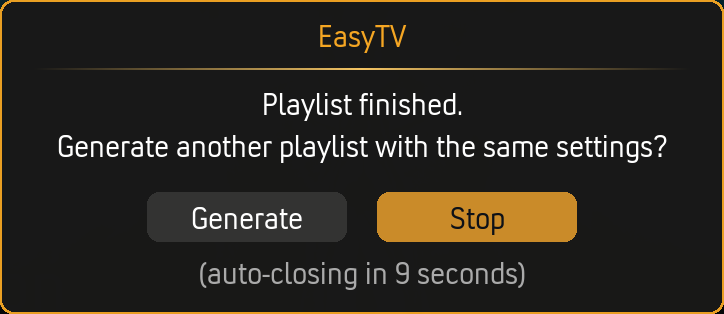
Settings → Random Playlist → Playlist Continuation → Prompt to continue playlist
When enabled, a dialog appears after the last item finishes:
Countdown Duration
Settings → Random Playlist → Playlist Continuation → Countdown duration (seconds)
| Value | Behavior |
|---|---|
| 0 | Prompt stays until you respond |
| 1-60 | Auto-dismisses after this many seconds (default: 20) |
If Countdown Expires
Settings → Random Playlist → Playlist Continuation → If countdown expires
| Option | Behavior on timeout |
|---|---|
| Stop (default) | Playback ends. No new playlist is generated. |
| Generate new playlist | A fresh shuffled playlist is built and starts playing. |
The dialog itself always offers both Generate and Stop buttons. This setting only controls which one fires when the countdown reaches zero without any user input.
Show Filtering
The same show filters from Browse Mode apply to Random Playlist.
Using Selected Shows
Settings → Shows → Show Filter → Use only selected shows
Limits which shows can appear in random playlists.
Smart Playlist Filtering
Use a Kodi smart playlist to dynamically filter shows.
Settings → Shows → Show Filter → Selection method → Use a smart playlist
This is incredibly powerful. See Smart Playlist Integration for details.
Episode Duration Filter
Filter shows by typical episode length.
Settings → Shows → Episode Duration
This affects random playlists. Only shows within your duration range are included.
Example use case: Create a "quick watch" playlist with only shows under 30 minutes.
Premiere Settings
Control which premiere episodes appear in random playlists.
Settings → Shows → Show Filter → Series premieres / Season premieres
Each setting has three modes:
| Mode | Series premieres (S01E01) | Season premieres (SxxE01) |
|---|---|---|
| Skip | Unstarted shows excluded from playlist | New-season episodes excluded |
| Mix in | Included alongside regular episodes (default) | Included alongside regular episodes (default) |
| Only | Playlist restricted to premieres only | Playlist restricted to premieres only |
When either setting is Only, the random playlist contains only premiere episodes. The other setting controls which types:
| Series premieres | Season premieres | Playlist contains |
|---|---|---|
| Only | Mix in | All premieres (S01E01 + season premieres) |
| Only | Skip | S01E01 only, to discover new shows |
| Mix in | Only | All premieres (S01E01 + season premieres) |
| Skip | Only | Season premieres only, to catch up on new seasons |
Random-Order Shows
Shows marked as "random order" behave differently in playlists.
Instead of playing the next sequential episode, EasyTV picks any random unwatched episode.
See Random-Order Shows for configuration details.
Notifications
Settings → Random Playlist → Notifications → Show info when playing
When enabled, a notification appears when each item starts:
Building Time
Random playlist generation typically takes a few seconds, depending on:
- Library size
- Whether partial prioritization is enabled
- Content type (TV only is faster than mixed)
| Scenario | Typical Time |
|---|---|
| TV only, small library | Under 1 second |
| TV + movies, partial prioritization | 3-5 seconds |
| Large library with all features | 5-10 seconds |
Example Configurations
Quick Background Watching
- Playlist content: TV episodes only
- Playlist length: 20
- Episode selection: Unwatched only
- Start with unfinished episodes: On
- Multiple episodes: Off
Movie Night Mix
- Playlist content: TV and movies
- Playlist length: 5
- Movie chance: 100%
- Movie selection: Unwatched only
- Movie playlist filter: "Highly Rated Movies" smart playlist
Comfort Rewatching
- Playlist content: TV episodes only
- Episode selection: Watched only
- Include only random-order shows (via show filter)
- Playlist length: 10
Catching Up on Partials
- Playlist content: TV and movies
- Start with unfinished episodes: On
- Start with unfinished movies: On
- Seek to resume point: On (both)
- Playlist length: 5
Related Pages
- Browse Mode: The other way to watch
- Settings Reference: All Random Playlist settings
- Smart Playlist Integration: Advanced filtering
- Smart Playlist Examples: Ready-to-use filters
- Random-Order Shows: Shuffle-friendly shows